Article
Song
Inquiry
2024, 08/24 13:53 (446day) Posted | 446day Updated
Low-quality mode will be available for timeshift videos from 1:00 p.m. on August 23, 2024 onwards.
A low-quality mode is available for both the PC and mobile versions, just like for live streaming.

The low-quality mode uses HEVC at less than 1.5Mbps, which is useful when you are in an area with poor signal or want to save on data.
When the picture quality switch icon is set to "SD", the video is being played in low picture quality mode.

Timeshifted content from before 1:00 p.m. on August 23, 2024 will be encoded and made available in order, starting with the permanently stored content.
Timeshifts that display the video quality switching icon are already encoded.

Automatically Translated. (Show original)
https://magical.kuku.lu/?3751 ツイート
2024, 08/22 02:51 (449day) Posted
While using the call function, open the settings screen from the bottom right of your call window.


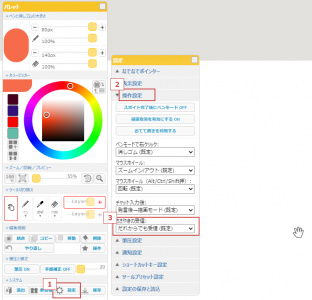
While using screen capture, you can set the volume of your desktop audio and microphone audio separately.
The echo canceller is on by default, but if you are using a headset or are not concerned about feedback, turning it off will improve sound quality.


Automatically Translated. (Show original)
https://magical.kuku.lu/?3750 ツイート
2024, 08/19 01:50 (452day) Posted | 433day Updated
You can now use the "kululuLIVE Browser Encoder", which allows you to stream using only a browser, without the need for streaming software such as OBS.

It will now be possible to stream on ChromeOS (Chromebooks, GIGA school devices, etc.), which was previously impossible to do no matter how hard you tried.
Of course, it can also be used on Windows, MacOS, smartphones and tablets, and can also be used by people who cannot use OBS or apps for religious reasons.

Obtain a streaming slot and open "Browser Encoder" from the menu.


In the opened browser encoder, click "Start Push Connection".


Once you have properly granted browser permissions, you will be presented with a screen to select your audio and video devices.
Select Camera if you want to broadcast the real world using your device's camera, or select "Capture screen" if you want to broadcast your device's screen.

*Due to the specifications of the OS, "Capture Screen" cannot be used on mobile devices. Images can only be captured by the camera. If you want to use "Capture Screen", please use the app version.
*If you select screen capture and microphone, the stereo mixer function will mix the sound from the microphone and the sound played on your device.

The push connection will start automatically. After that, you can switch to public streaming as usual.


The kukuluLIVE Overlay will be automatically composited into the broadcast video, and if you enable overlays such as comments, they will be composited into the broadcast video.
No additional settings are required like with OBS.
https://live.erinn.biz/login.live.overlay_config.php?tab=fcs


On mobile devices such as smartphones and tablets, comments will be displayed in the bottom half of the screen, just like the app version.
You can use the read aloud function in the comment section settings.
As with the app version, video and audio will not be sent unless the browser encoder is in the foreground, but unlike the app version, the push will not be cut off immediately.


Unlike a normal push connection, the browser encoder connects to a server-side encoder using WebRTC (WHIP).
The server converts the RTMP to HEVC and then pushes it.
This makes it less likely for the connection to be lost, even in environments with unstable specifications or lines and frequent frame drops.
RTMP will disconnect after 13 seconds of inactivity, but WHIP will tolerate up to 3 minutes.

・If you are pushing content on the go via a PC or dedicated distribution device, it may be possible to replace it with this browser encoder.
・kukuluLIVE Overlay can be used even in mobile environments.
・You can connect using the same URL even if the distribution slot changes.

Automatically Translated. (Show original)
https://magical.kuku.lu/?3749 ツイート
2024, 08/11 12:02 (459day) Posted | 457day Updated
- Improved catch-up playback function .<br> There is no longer a time limit (2 hours) for catch-up playback; you can now always go back to the start of the broadcast.
You can now also pause/resume playback.

Even if the number of comments displayed exceeds the limit, you can now display all comments by following the playback position.
As with time-shift playback, a comment meter is now displayed that shows where the comments are most exciting.

Previously, when you reconnected a push stream, you were unable to go back to the time before the last disconnection, but now you can always go back to the start of the stream.
Replays can also be created from the start of streaming to real-time.

If the broadcast ends or viewing is interrupted during catch-up playback,
Timeshift playback now automatically seeks to that point when it starts.

It is now possible to play back HEVC streams (H264 converted streams) in non-HEVC-compatible environments such as Firefox.

- You can now pause/resume during live viewing. <br>You can pause playback at any time while watching live content, and resume viewing from the same position using catch-up playback.

- Timeshift storage period has been extended. <br>A newly designed recording server has been put into operation, tripling the capacity.
On average, videos are now kept for 400 days after they were last viewed.

Automatically Translated. (Show original)
https://magical.kuku.lu/?3748 ツイート
2024, 07/09 13:15 (492day) Posted | 480day Updated
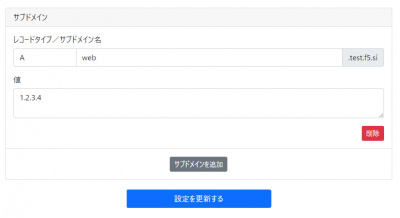
You can now set NS records for domains acquired through DDNS Now.
NS records should be set up with all other records/subdomains/wildcards set to off.

Since it supports Public Suffix Lists, by setting NS records,
You can use CDN services such as Cloudflare in the same way as you would use your own domain.


You can create email-related records via NS records, which cannot be created by DDNS Now alone.
To prevent spam, when you set up an NS record, you must authenticate using a Japanese mobile phone number (with voice line).
There are no call charges for authentication.

Automatically Translated. (Show original)
https://magical.kuku.lu/?3747 ツイート
2024, 07/06 02:56 (496day) Posted | 495day Updated
- Improved server-side rendering engine .<br>This time, the server-side rendering engine has been changed to a GPU-based one.
In most environments, server-side rendering will be done in much the same way as client-side rendering.

In particular, when drawing with a specific color at a significantly lower transparency level (15% or less), the problem of the color being drawn differently from the actual color is greatly alleviated.


However, on the other hand, in environments where Canvas drawing is not GPU-assisted, there will be a delay in drawing.

Devices that are no longer hardware compatible are now considered to be of historical value.
If you have disabled support yourself, this will affect you.
If you have turned off "Use graphics acceleration when available," please turn it back on.


- Improved to prevent deterioration of image quality when moving or copying .<br>If you move or copy without changing the original size, smoothing will not be performed.
This makes it possible to avoid the blurring phenomenon.

- Added "Maximum number of participants limit" function .<br>Owners/co-owners can set the maximum number of participants by going to Room entry page > Change room settings > Custom.
When the number of people in the room reaches the set limit, new participants will not be able to join.
Even if the meeting is full, people already participating can still connect from another device or disconnect and reconnect.
Owners/co-owners can enter even if the venue is full.
If a public room becomes full, it will automatically become private. If it becomes unfull, it will automatically become public.


Automatically Translated. (Show original)
https://magical.kuku.lu/?3746 ツイート
2024, 07/04 12:19 (497day) Posted | 497day Updated
For streaming slots that are in preparation and where public/private streaming has not yet taken place, we have made changes so that the following will not take place:

・Recording (saving time shift)
- Capture (automatic thumbnail saving every 5 minutes)
・Replay (save replay)
・Catch-up viewing

Recording will begin as soon as a public or private broadcast begins, and replays and catch-up viewing will be available from that point onwards.
Only distribution slots acquired after this specification change are eligible.

Once a streaming slot has started public/private streaming, recording will not stop even if you return it to preparation mode.

Also, please note that you can still watch the video even while it is being prepared by directly accessing the broadcaster's URL, so once push connection is made the video will basically be publicly available.

Automatically Translated. (Show original)
https://magical.kuku.lu/?3745 ツイート
2024, 06/27 23:17 (504day) Posted
We have confirmed that kukuluLIVE Coffret works properly with all functions on the ARM version of Windows 11.
Distribution can be done as usual using products known as Copilot+ PC.

Automatically Translated. (Show original)
https://magical.kuku.lu/?3744 ツイート
2024, 06/21 17:46 (510day) Posted | 510day Updated
We have added a function that allows you to register and publish original backgrounds, line drawings (coloring pages), frames, dividing lines, etc.

On the "Add original background/line drawing" page, register the PNG image you have prepared.
https://draw.kuku.lu/mypage_originalbg.php

When you register, you can choose how you want to be placed on the canvas.
By placing the background image in the back and the line art and frame in the front, you can use it for coloring books, etc.


Registering it alone will not make it public, and it will only be available for use in rooms that you own.
With the previous feature, if you registered a background or other item to the room itself, you had to re-register it if you changed rooms, but with this new feature you can call it up at any time, even across rooms.

If you make it public, anyone can use it. You can also create a new room from there.

https://draw.kuku.lu/originalbg.php

If you want to use them from within the room, the owner can display the list by doing the following:


Once you have completed a coloring book or other work, you can "save the current canvas to the server" and it will be posted as an example of your work.


Automatically Translated. (Show original)
https://magical.kuku.lu/?3743 ツイート
2024, 06/20 03:45 (512day) Posted | 511day Updated
Previously, background images could only be placed behind the canvas.
It is now possible to place it in front of the canvas.

If you are adding it from the room entry page, select "Place in front of canvas" in "Paste method" under "Add your own background image or line drawing."


The background image will be placed in front of the canvas so that it is not obscured by the canvas image.


This is useful when you want to fix line art or borders, or when you want to create a simple filter that uses frames or transparency.

If you are creating from within a room, select "Create Line Art" when creating.


Automatically Translated. (Show original)
https://magical.kuku.lu/?3742 ツイート
2 / 47 Page(s)


© Kukusama.